PDF
PDF documents
Worksheets, dossiers, presentations

SynapAI · AI-supported learning platform
Teaching material becomes a personal learning path.
On Swiss servers. With a free account to try out and clear learning tracks for your lessons.
SynapAI supports your teaching. The pedagogical decision remains yours.
Your material
Everything that is already present in the lesson becomes the starting point.
SynapAI analyzed
Materials are bundled, understood and structured didactically.
SynapAI
Step 1
Material is being analyzed
SynapAI recognizes content, structure, task formats and thematic connections in the submitted material.
Step 2
Tasks are being prepared
Tasks are extracted from the material and prepared for an adaptive learning setting.
Step 3
Keywords and LP21 competencies
SynapAI suggests keywords, topic areas and appropriate competencies from Curriculum 21.
Step 4
You shape the individual components of your learning unit with flexibility and freedom.
You define the introduction, learning product, tasks, transfer tasks and reflection for the learning unit.
Step 5
Individual and differentiated learning units are assigned
Completed, individual and differentiated learning units are assigned to your learners.
Curriculum 21 competencies
SynapAI suggests suitable competencies and makes learning goals visible.
Personalized learning units
The material is used to create suitable learning units for individual learners.
Very active8 units
Very active10 units
Very active4 units
Very active3 units
Evidence instead of gut feeling
While the learners work with SynapAI, evidence for the defined competencies is continuously collected and visible in the competency network.
The learning path is there
While you stay on top of things, your learners continue working in a clear, guided view.
From a student perspective
This view leads through the five phases of a learning unit: introduction, learning product, tasks, transfer tasks and reflection. Click through, get to know SynapAI and try out the chat with Synu in phase 3 tasks. Have fun!
phase 1: introduction – Today we'll cover the topic of reading and calculating time. This is important because it allows you to plan better in everyday life: the way to school, training, appointments or breaks.
Noah Brunner
Student

From your perspective
You open Noah's card and see exactly the learning unit "Reading and calculating time": time, learning product, tasks, synu-chat, transfer and reflection.
Generated on June 24, 2026, 07:36
Noah demonstrates a solid understanding of reading analog and digital times. He usually calculates time periods correctly, especially if the start time and duration are clearly noted. For tasks with several intermediate steps, he still needs a short control step.
Learning level:
Noah can read time, calculate simple time periods and organize a daily schedule sensibly. The transfer answer shows that he can use duration and end time in everyday life.
Strengthen:
The step lists in the learning product are comprehensible. He uses Synus queries productively and corrects his invoice independently.
Abnormalities:
With combined time periods, Noah does not always check whether intermediate times and end times match.
Next Steps:
Continue working with two to three daily plans: have the start time, duration, end time and buffer marked.
From learning path to learning track
Create a free account, upload material, try out the learning path. We are happy to show the tool personally to schools.
Classroom example
A teacher prepares several elective learning units. Synu introduces each child to the topic individually and supports learning products, adaptive tasks and transfer. The teacher can coach where it matters while retaining an overview through visible learning evidence.
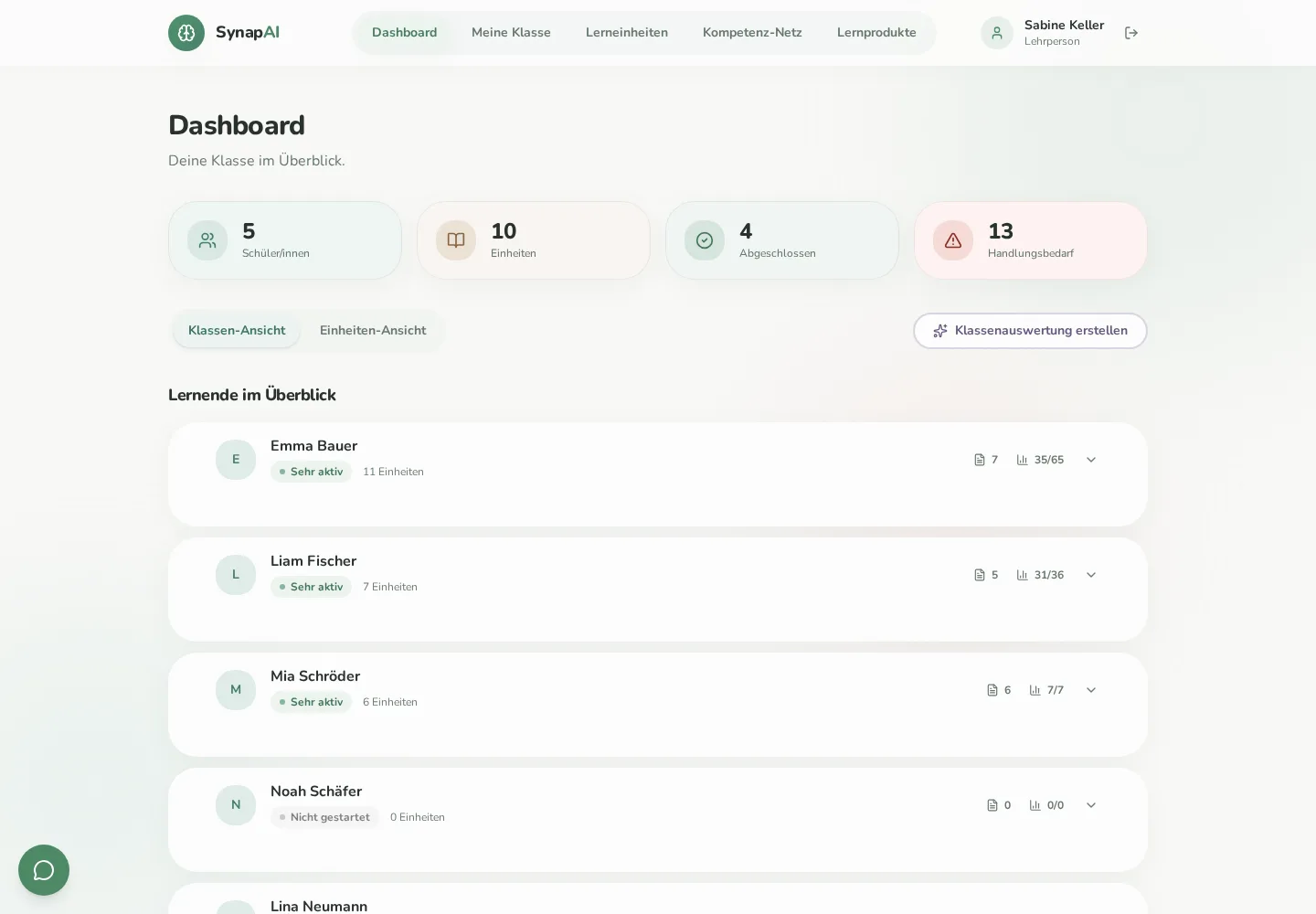
SynapAI connects your teaching materials with Curriculum 21 competencies, creating guided units, visible learning products and clear signals for your support.
Direct links to Curriculum 21 competencies and visible learning evidence in the competency network.
Developed in St Gallen in collaboration with the University of Teacher Education St Gallen and the EduAI Lab.
Implementation partner for product development, design and technical delivery.
SynapAI runs on Swiss servers. Start for free or request a demo.
Swiss hosting, role-based access and clearly separated views. View the German privacy policy
Partnership with the Swiss EdTech ecosystem – in preparation.
Pricing
From a first free trial to a school-wide rollout, SynapAI grows with classroom use.
Materials can be reused in multiple learning units.
For individual teachers who want to try SynapAI with their first class.
CHF 0.00
1 teacher · 1 class
What’s included
For teachers who use SynapAI regularly with one or more classes.
CHF 29.95
/ active class per month
What’s included
For schools that use SynapAI across the staff and share units.
Price on request
An offer tailored to the size and needs of your school.
What’s included
SynapAI saves preparation time, creates guided paths from your own materials and makes learning evidence visible for further support.
Upload materials, define the building blocks and assign the unit. SynapAI prepares the introduction, adaptive tasks and transfer while you retain educational control.
Create self-guided learning and practice units and receive summaries and recommendations for future lessons.
SynapAI supports PDF, Word and PowerPoint files as well as images and web content.
SynapAI works across Curriculum 21 subjects, particularly where tasks, learning products, transfer and reflection matter.
You see units, products, task progress, Synu conversations, transfer answers, competency observations and support signals.
No. SynapAI makes learning evidence visible. Educational interpretation and assessment remain with the teacher.
SynapAI runs on Swiss servers. Access is role-based and views are separated by role.
Read the German privacy policyYes. Create a free account or contact us to arrange a demo for your school.
Get in touchCreate a free account or request a short demo of the tool.